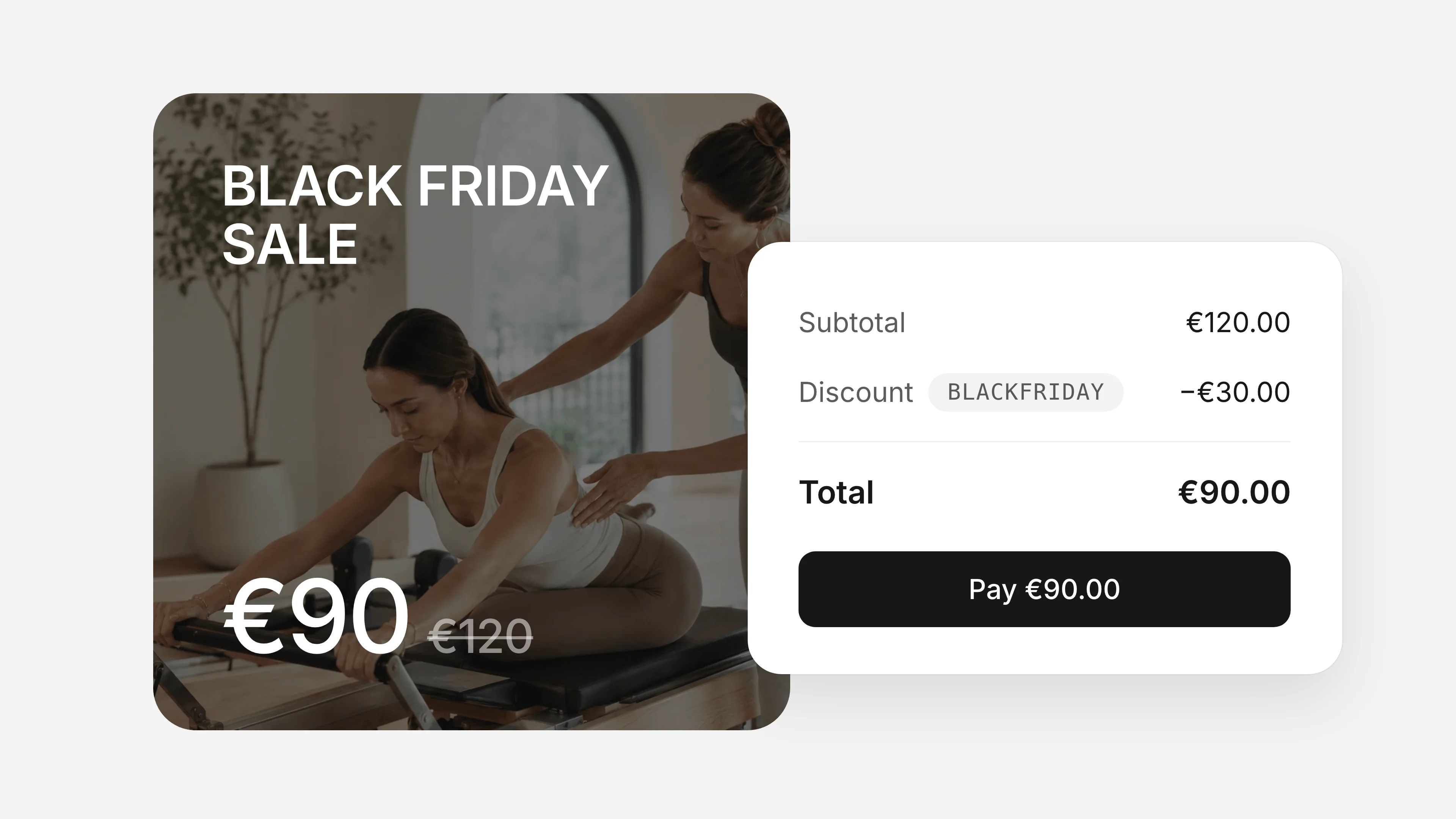
Black Friday is one of the few times a year when people go looking for a deal on a gym membership or class pack. A clear offer and a few emails can bring in new clients and class pack sales in a few days, and the cash helps through the quiet weeks of December.
This guide walks you through the whole setup, step by step:
- Pick your offer and dates
- Create a Black Friday pricing plan
- Or create a coupon code for plans you already sell
- Email your clients
- Remind them, then switch the offer off
The examples use a sample Pilates studio called Flow Pilates, set up in Time2book. The steps work the same for any gym, studio or personal trainer.
Prefer to watch? This video shows the whole setup for Flow Pilates.
Step 1: Pick Your Offer and Dates
Start with one main offer. One deal is easier to explain, easier to share, and easier to switch off.
Choose the deal
These are the Black Friday deals that work best for fitness studios, and how to set each one up:
| Deal | Example | Set it up as |
|---|---|---|
| Discounted class pack | 10 classes for €90 instead of €120 | Black Friday plan |
| Bonus classes | Buy 10 classes, get 2 free | Black Friday plan |
| Intro offer for new clients | 3 classes for €39 | Black Friday plan |
| First month off a membership | 20% off your first month | Coupon code, first charge only |
| Discount on the first 3 months | 20% off your first 3 months | Coupon code, limited months |
| Discount on several plans | 20% off any membership or pack | Coupon code on those plans |
| Thank-you deal for current members | 5 extra classes for €40 | Private plan, emailed to members |
| Gift cards for Christmas | €90 gift card, valid 12 months | Gift card |
| New Year pack, sold early | "January reset" pack, used in January | Black Friday plan |
Need more ideas? See our lists of intro offer ideas and gift card ideas. Discounted gift cards sell well on Black Friday, because people start buying Christmas presents.
Keep the discount sensible
Most studios give 15% to 30% off. 50% off fills classes with people who leave when the price goes back up. If you want the deal to feel bigger, add value instead: extra classes, a free private session, or a free class for a friend.
Set the dates
In 2026, Black Friday is Friday, November 27 and Cyber Monday is Monday, November 30. Most studios run the deal from Friday morning to Monday night. Want a longer sale? Start early, on Monday, November 23. Decide the exact end time now, because you'll put it in every email.
Step 2: Create a Black Friday Pricing Plan
A special plan is the simplest way to sell a Black Friday class pack. Clients see it on your booking page next to your normal plans, with no code to remember.
- Go to Catalog → Pricing and click +.
- Name it, for example Black Friday 10 Sessions. In the description, say when the offer ends: "Black Friday deal, ends Monday, November 30."
- Add an image if you like. A simple "Black Friday" image makes the plan stand out on your booking page and in emails.
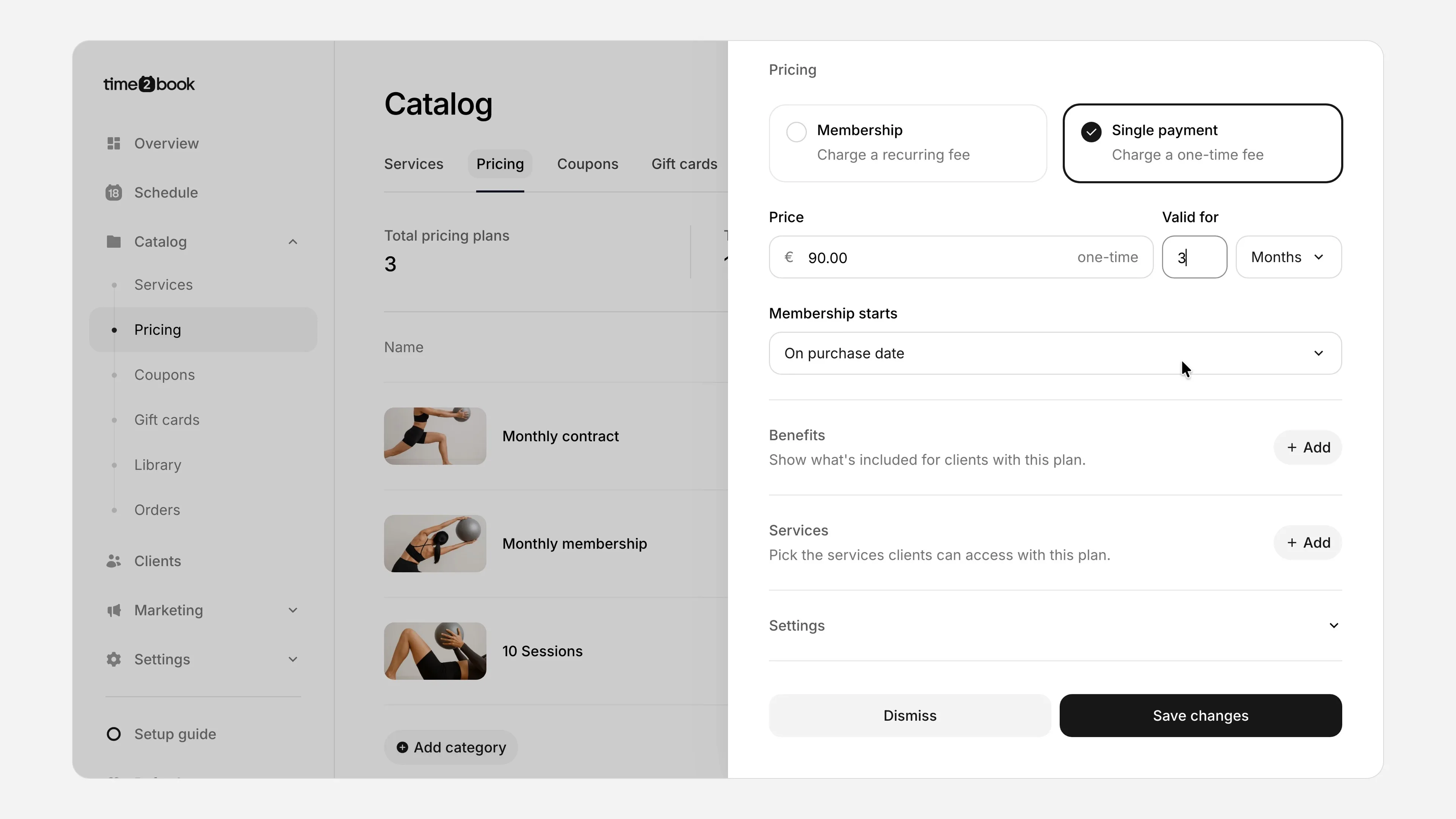
- Under Pricing, choose Single payment. Enter the price (€90) and how long the classes are valid (3 months).
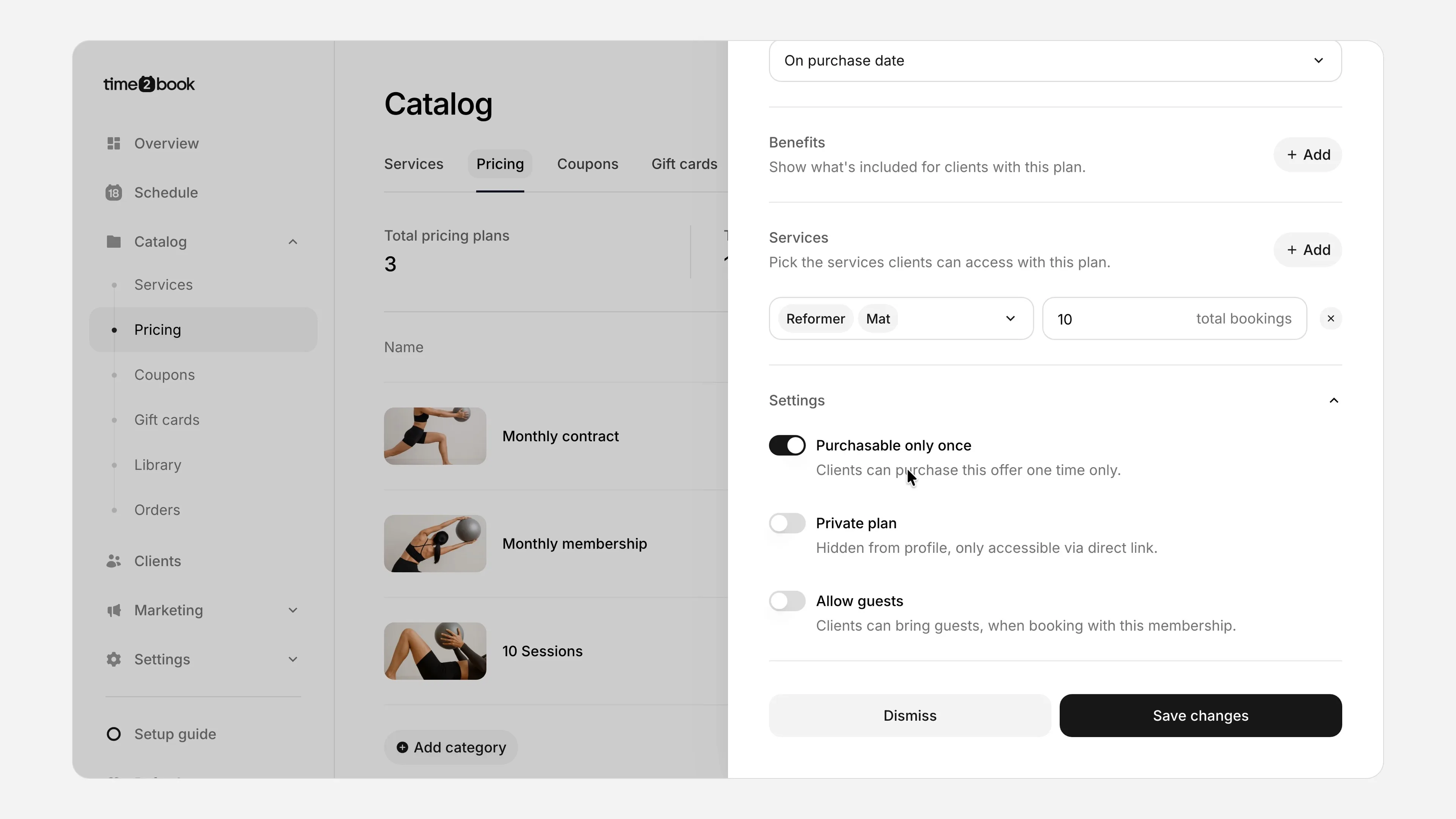
- Under Services, click Add, pick the classes it covers (Mat and Reformer) and enter how many (10).
- Open Settings and turn on Purchasable only once, so each client can buy it one time and nobody stocks up on cheap packs.
- Click Save changes.
Tips:
- Hide it until the sale starts. Turn on Private plan to keep it off your booking page. Anyone with the direct link can still buy it, which is handy for early access. Turn it off when the sale starts.
- Show the old price. Put "instead of €120" in the description, so clients see the saving.
Step 3: Or Create a Coupon Code
A coupon code is better when you want to discount plans you already sell, especially memberships. Clients enter the code at checkout.
- Go to Catalog → Coupons and click +.
- Name it Black Friday and enter the code clients will type, such as BLACKFRIDAY.
- Choose Percentage discount and enter 20. For a set amount off, like €20 off the first month, choose Fixed amount discount instead.
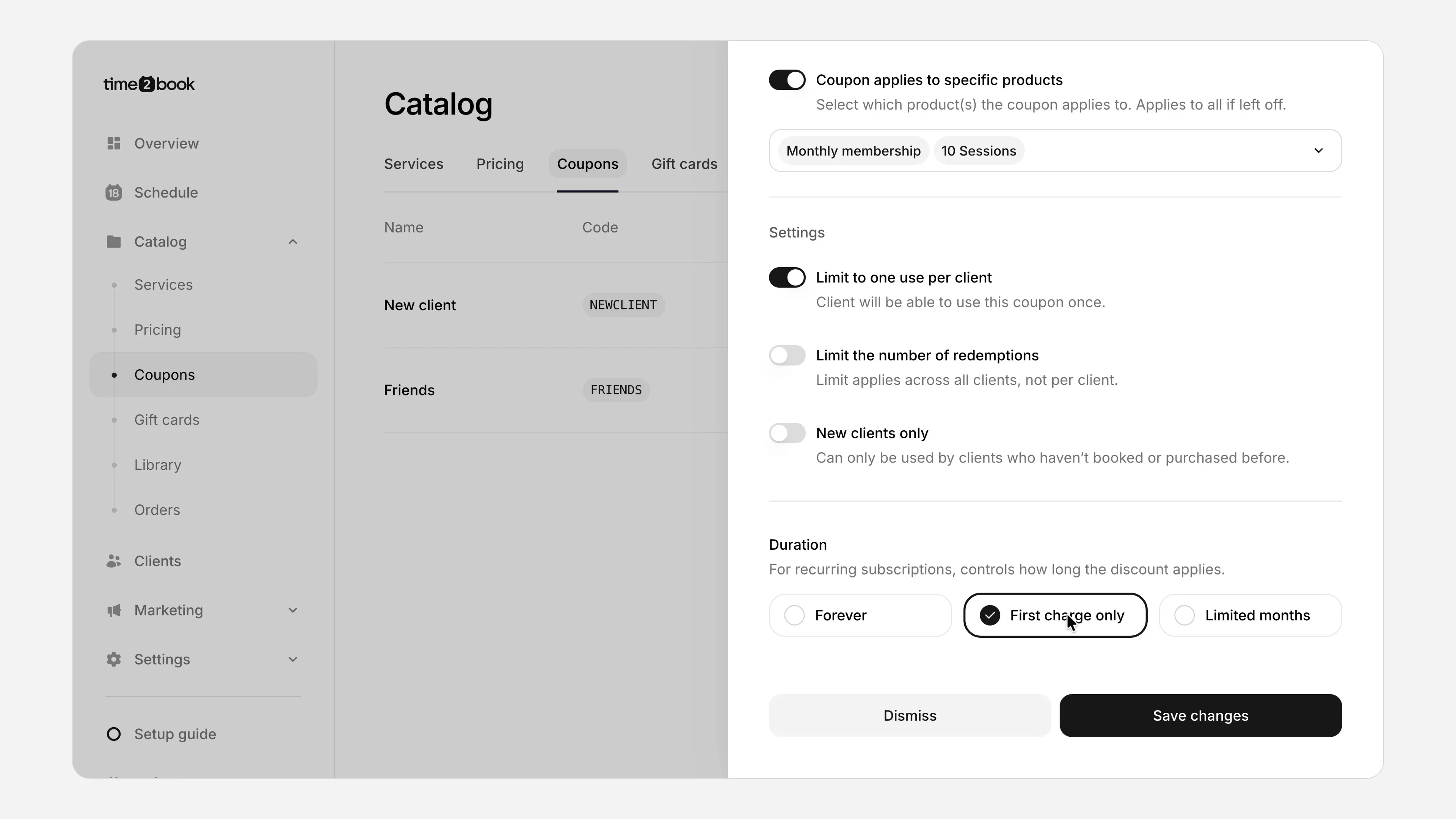
- Turn on Coupon applies to specific products and pick the plans it works on, such as Monthly membership and 10 Sessions. Leave out drop-ins.
- Turn on Limit to one use per client. Turn on New clients only too, if the deal is just for new people.
- Under Duration, choose how long the discount lasts on memberships: First charge only, Limited months (for example the first 3 months) or Forever.
- Click Save changes.
Tip: a coupon works as soon as you save it, so create it on the morning the sale starts, not a week before.
Plan or coupon: which one?
| Black Friday plan | Coupon code | |
|---|---|---|
| What it is | A new plan with a special price | A discount on plans you already sell |
| Client needs a code | No | Yes, at checkout |
| Good for | Class packs, bundles, intro offers | Memberships, several plans at once |
| Once per client | "Purchasable only once" | "Limit to one use per client" |
| Can be hidden early | Yes, as a private plan | No, it works once saved |
| When the sale ends | Archive the plan | Archive the coupon |
Many studios do both: a Black Friday pack that anyone can see on the booking page, and a coupon code for memberships that only goes out by email.
Set up your Black Friday deal
Special plans, coupon codes and email campaigns, built into your booking software. Try Time2book free for 7 days.
Black Friday: 50% off for 3 months with code BLACKFRIDAY26, until November 30.
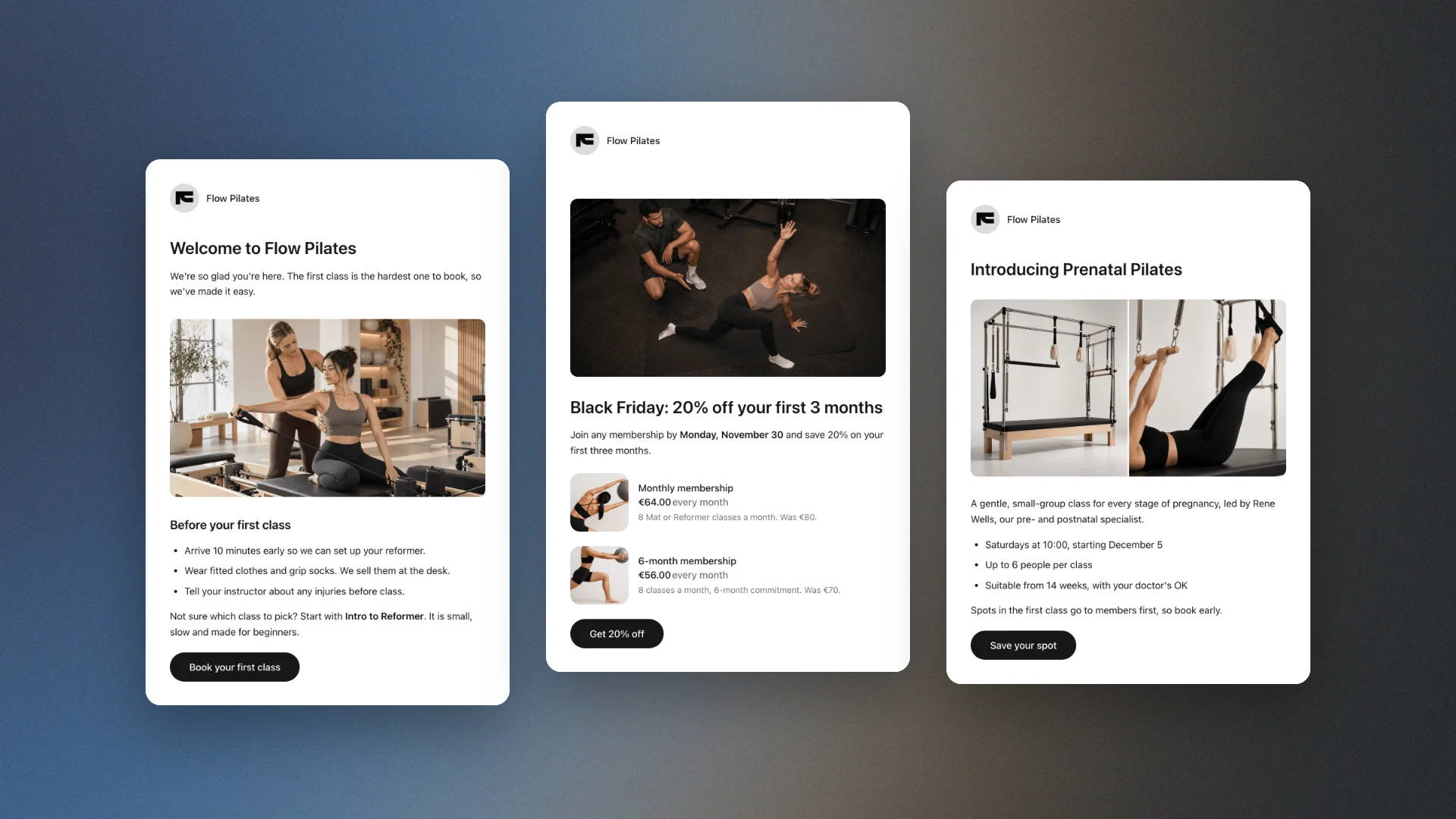
Step 4: Email Your Clients
Your email list is where most Black Friday sales come from. These are people who already know your studio.
- Go to Marketing → Emails and click +.
- Write a short heading with the offer, like "Black Friday: 10 classes for €90", and one sentence that says what's included and when it ends.
- Click Add element, choose Pricing card and pick your Black Friday plan. The card shows the price and links to the plan on your booking page.
- If you made a coupon, add the code in bold and say which plans it works on.
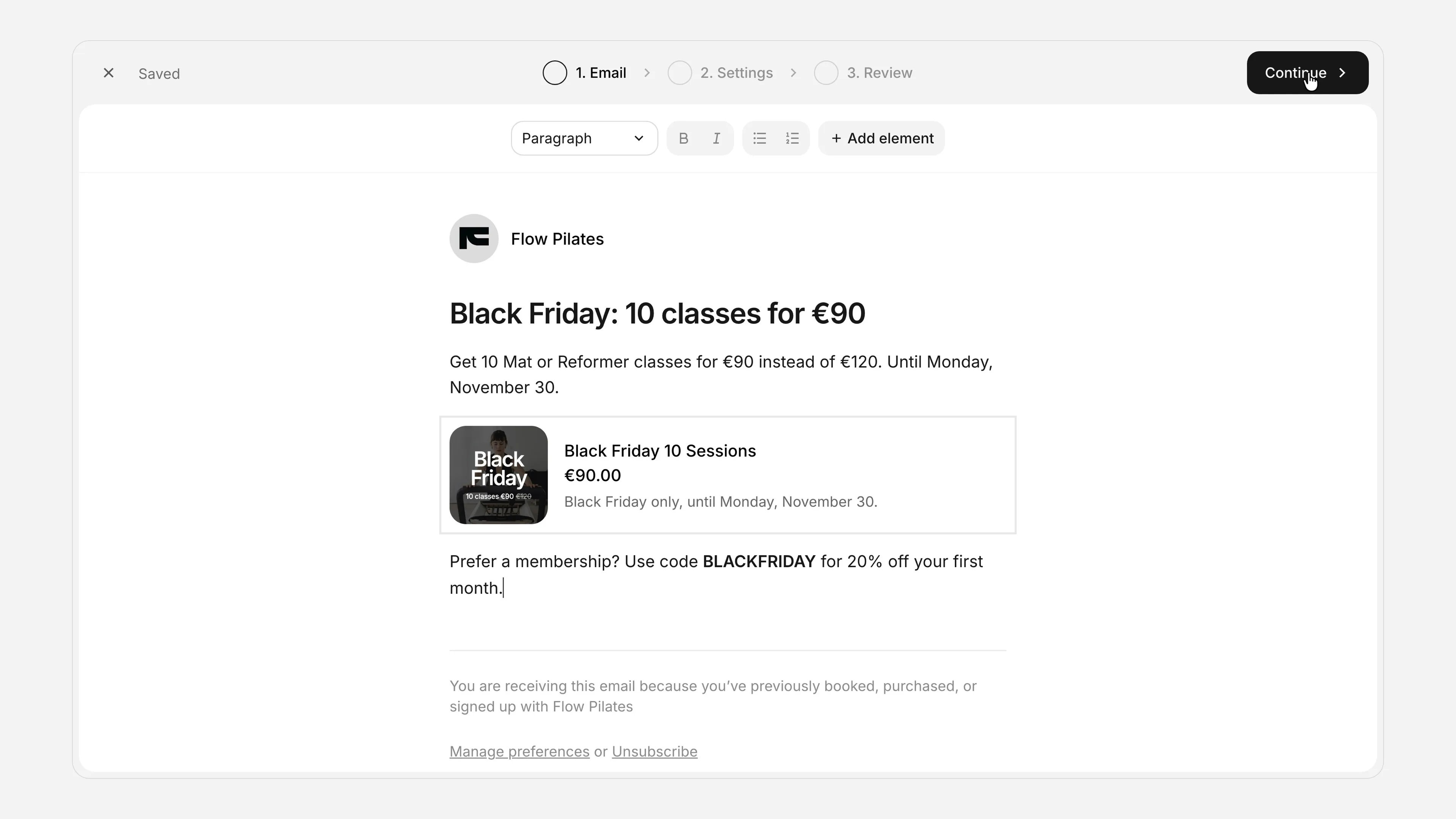
- Click Continue and enter a subject line with the offer and the deadline.
- Choose who gets it: Everyone who's subscribed, or a segment, such as clients who never booked or clients who booked only once.
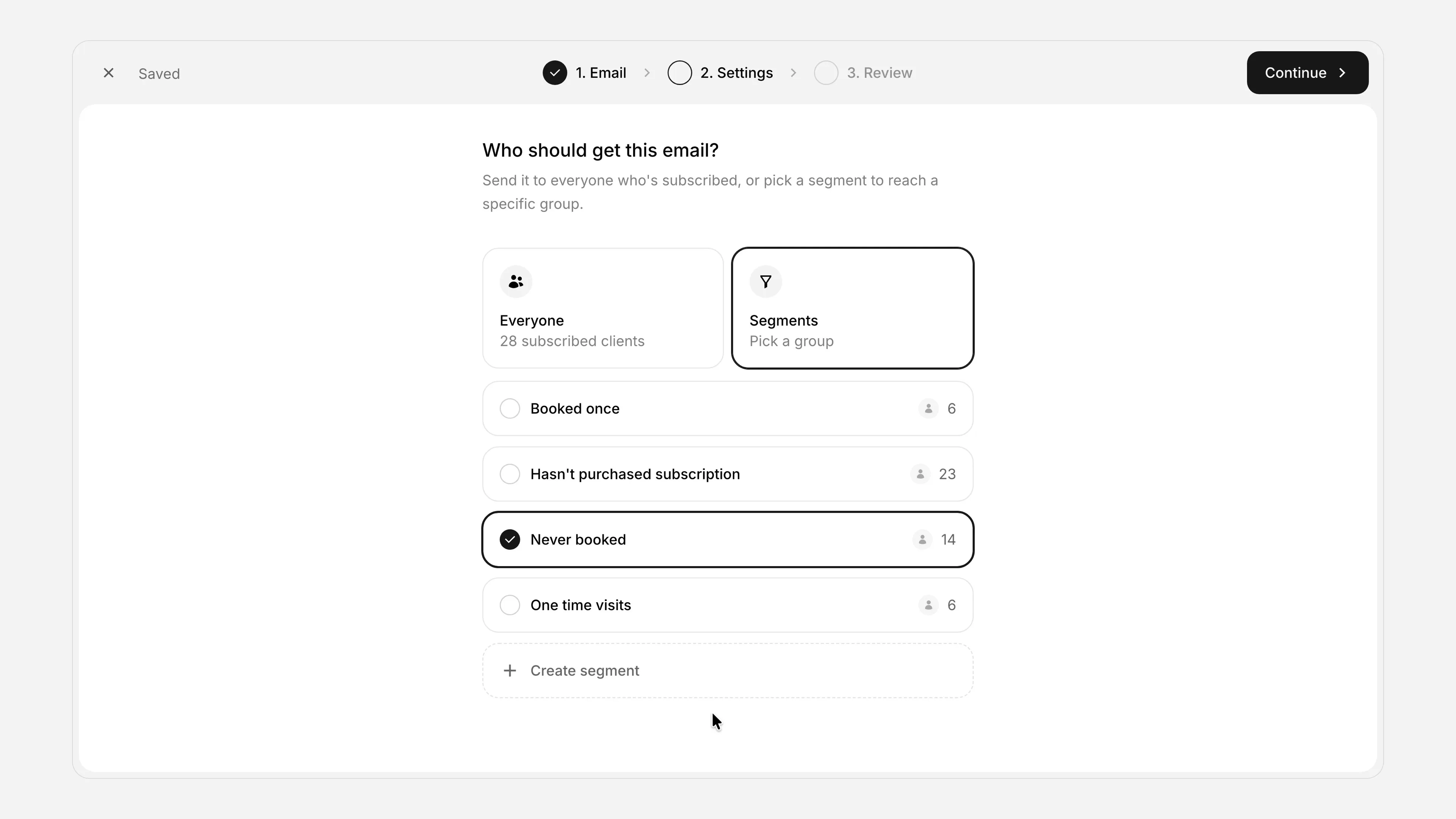
- Click Continue, check the email, and click Send email.
Subject lines that work
- Black Friday: 10 classes for €90, until Monday
- 20% off your first month (this weekend only)
- Our best deal of the year opens Friday
- Early access: Black Friday starts now for you
- Last chance: the Black Friday pack ends tonight
Keep them short and specific. Put the deal and the deadline in the subject, not "Big news!" or "Don't miss out!!!".
Don't forget your members. A deal only for new people can feel unfair to the people who pay you every month. Send them their own email, with a thank-you offer such as a private plan for extra classes.
For more templates, see our guide to gym email marketing.
Step 5: Remind Clients, Then Switch the Offer Off
Most people don't buy from the first email, so send a few. Here's a schedule for a sale that starts early, in Black Friday week:
| When | |
|---|---|
| Monday, Nov 23 | Early start: the Black Friday deal is live, and when it ends. |
| Friday, Nov 27 | Black Friday: the deal is on until Monday. |
| Sunday, Nov 29 | Reminder: one day left. |
| Monday, Nov 30 morning | Cyber Monday: last chance. |
| Monday, Nov 30 evening | Ends tonight, with the exact end time. |
Starting on Friday instead? Skip the first email and say when the deal ends in the Black Friday one.
Switch the offer off
Plans and coupons don't switch off by themselves, so archive them at the end time you promised:
- Plan: in Catalog → Pricing, open the menu next to the plan and click Archive. Clients who bought it keep their classes.
- Coupon: archive it in Catalog → Coupons. The code stops working.
Mistakes to Avoid
- Confusing terms. "15% off 2 or more packs bought before midnight, peak times excluded" needs a calculator and a lawyer. "10 classes for €90" needs neither.
- No end date. Without a deadline, there's no reason to buy now. Put it in every email.
- Discounting what members already pay for. A cheaper membership for new people annoys members paying full price. Give new people a pack, and give members their own thank-you deal.
- Forgetting to switch it off. Archive the plan and coupon at the end time you promised, or the deal keeps selling.
- No follow-up. Black Friday buyers are new clients. Send them a welcome email, and in January check who's still booking.
Run your Black Friday sale in Time2book
Create a Black Friday plan or coupon, email your clients, and take payments online. Free for 7 days.
Black Friday: 50% off for 3 months with code BLACKFRIDAY26, until November 30.
Frequently Asked Questions About Black Friday Deals for Fitness Studios
Pick one simple offer, such as 10 classes for €90 instead of €120. Then create it in your booking software, either as a special Black Friday pricing plan or as a coupon code for plans you already sell. Email your clients when the sale starts, send a reminder before it ends, and switch the offer off on the end date.
Make a special plan when the offer is a new product with its own price, like a Black Friday 10-class pack. Use a coupon code when you want to discount plans you already sell, like 20% off the first month of a membership. In Time2book you can do either: a plan can be set to "Purchasable only once", and a coupon can be limited to specific plans and to one use per client.
Most gyms and studios give 15% to 30% off. That is enough to feel like a real deal without training clients to wait for sales. Instead of a deeper discount, add value: extra classes in a pack, a free private session, or a free class for a friend.
Set up the offer a few days before. Launch on Black Friday morning, or start early on the Monday of Black Friday week. Send a reminder over the weekend, and a last-chance email on Cyber Monday. In 2026, Black Friday is November 27 and Cyber Monday is November 30.
For a Black Friday plan, turn on "Purchasable only once". For a coupon code, turn on "Limit to one use per client". You can also make a coupon work for new clients only.
Plans and coupons don't switch off by themselves, so archive them at the end time you promised. An archived plan is hidden from your booking page and an archived coupon code stops working. Clients who already bought keep what they paid for.