time2book logotype
EN
Product
Class scheduling Manage classes and schedules Client management All your client data in one place Payments Memberships, packages, and drop-ins
Business
Pilates For pilates studios and trainers.
Yoga For yoga studios and yoga teachers.
Gym For gyms, fitness businesses, and training facilities.
CrossFit For CrossFit gyms and fitness coaches. Boxing For boxing gyms, trainers, and fight clubs. Dance For dance studios, instructors, and choreographers. Martial arts For martial arts studios, instructors, and dojos. Group training For small group sessions, bootcamps, and fitness teams. Spin For spin studios, cycling clubs, and instructors.
Pricing Help Refer & Earn Blog
EN
Sign in Sign up
Help Classes
Create a class

Create a class

Classes in Time2book are recurring group sessions that multiple clients can join, such as Pilates, Yoga, or Fitness classes. You can set drop-in (one session) price, duration, and capacity, making it easy for clients to book their spot online. This guide walks you through how to create a class in your catalog.


Step 1: Go to services

  1. From the left-hand menu, click Catalog → Services.

  2. Click the + button in the top-right corner to add a new service.
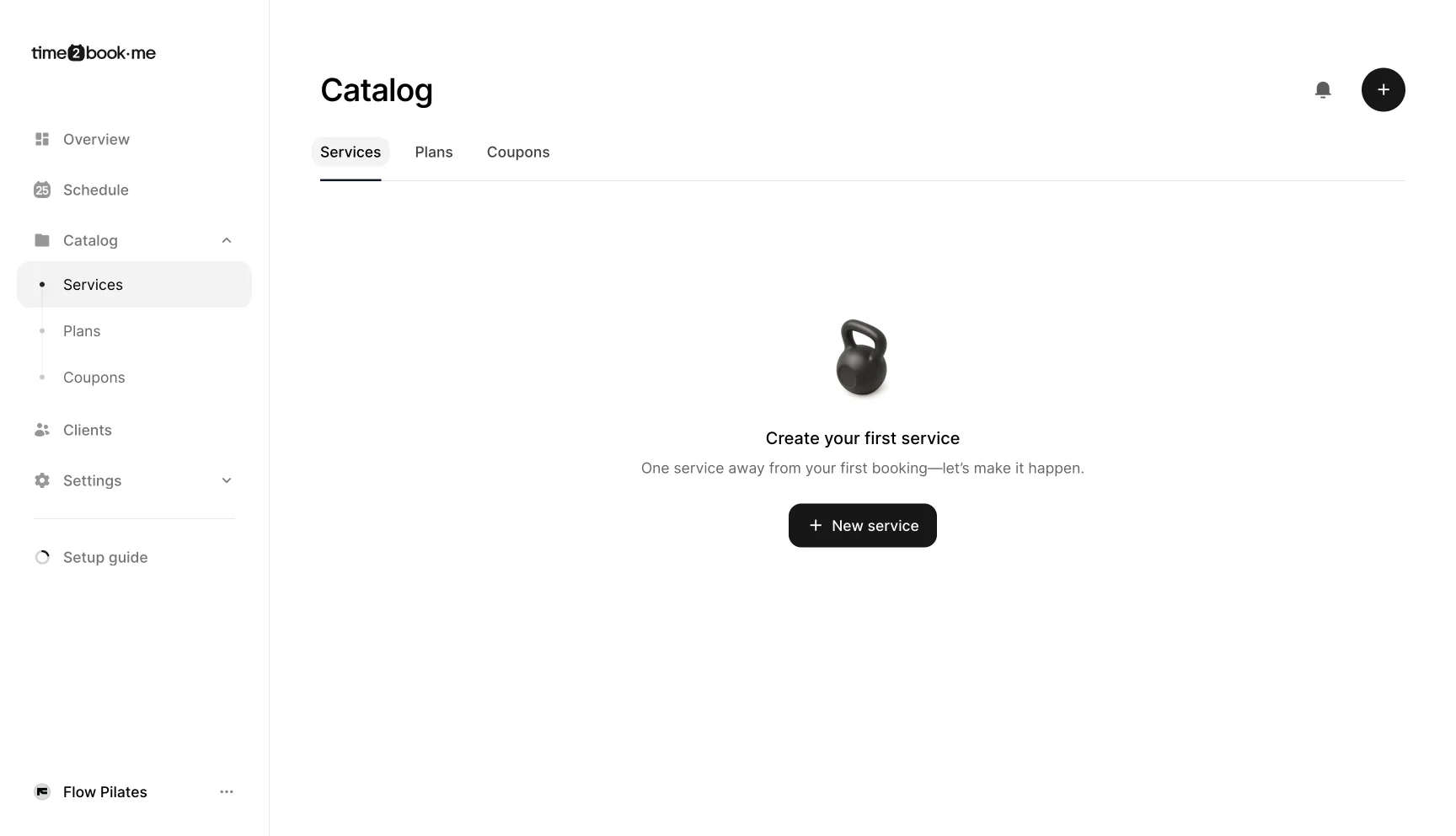
Catalog screen in Time2book prompting studio owners to create their first service, with a button to add a new class or appointment.

Step 2: Choose service type

  • In the service type section, select class.

  • Classes are designed for group bookings where multiple clients can join.


Step 3: Add service details

Fill out the main details for your class:

  • Name – Give your class a clear name (e.g., Mat, Reformer).

  • Description – Add a short description so clients know what to expect (e.g., A full-body Pilates session on the Reformer to boost strength, flexibility, and balance.).

  • Price – Set the cost for one session (e.g., €20).

  • Location – Choose the location where this class will take place.

  • Capacity – Decide how many clients can join each session (e.g., 10).
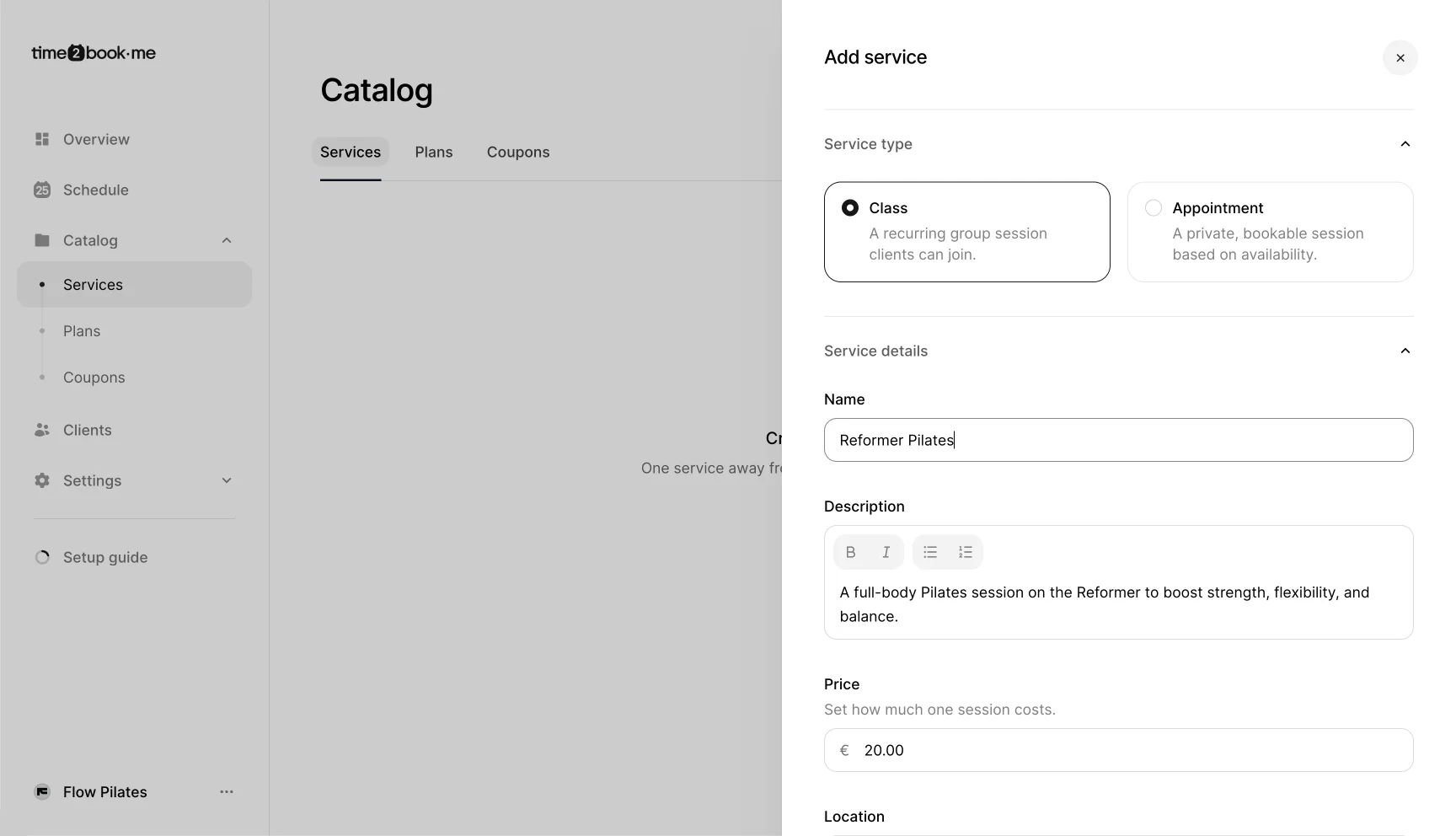
Add service dialog in Time2book showing how to create a new Pilates class with service type, name, description, price, and location fields.

Step 4: Set time settings

  • Duration – Enter how long each class should last (e.g., 60 minutes).


Step 5: Save your class

  • Once you’ve entered all details, click Save changes.

  • Your new class will now appear in the Services list under your catalog.


What’s next?

After creating your class, you’ll be able to add it to your schedule so clients can book it. We’ll cover that process in the next article: Scheduling a class.

time2book icon
Solutions
Martial arts studio software Group training software
Boxing coach software
Ski instructor software
Padel coach software
Yoga teacher software
Physiotherapist software
Personal trainer software
Pilates instructor software
Yoga studio software
Dance studio software
Tennis coach software
Music teacher software
Football academy software
Pole dance software
Pilates studio software
Spin studio software
Gym software
CrossFit gym software
Boxing gym software
Massage therapist software
Company
Contact us Become an affiliate Privacy Policy Terms of Service Cookie preferences
Product
Class scheduling Client management Payments
Resources
Help Blog
Compare
Mindbody Alternative Momence Alternative LegitFit Alternative

2026 © time2book·me - All rights reserved.